
What is Retrieval-Augmented Generation (RAG)? A Guide for SMBs
If you have spent any time online recently, you will know that Artificial Intelligence (AI) is no longer just the playground of massive tech corporations. Small and medium-sized businesses (SMBs) are increasingly using tools like ChatGPT to write marketing copy, draft emails, and brainstorm ideas.
But there is a glaring problem: standard AI does not know your business. It does not know your bespoke products, your internal policies, or the specific nuances of your local market.
This is where Retrieval-Augmented Generation (RAG) steps in. It sounds like a piece of jargon dreamed up in a Silicon Valley laboratory, but its underlying concept is remarkably simple—and it is entirely transforming how SMBs can leverage AI. Here is a straightforward, jargon-free guide to what RAG is, how it works, and why it might be the most important technology your business adopts this year.
What is Retrieval-Augmented Generation (RAG)?
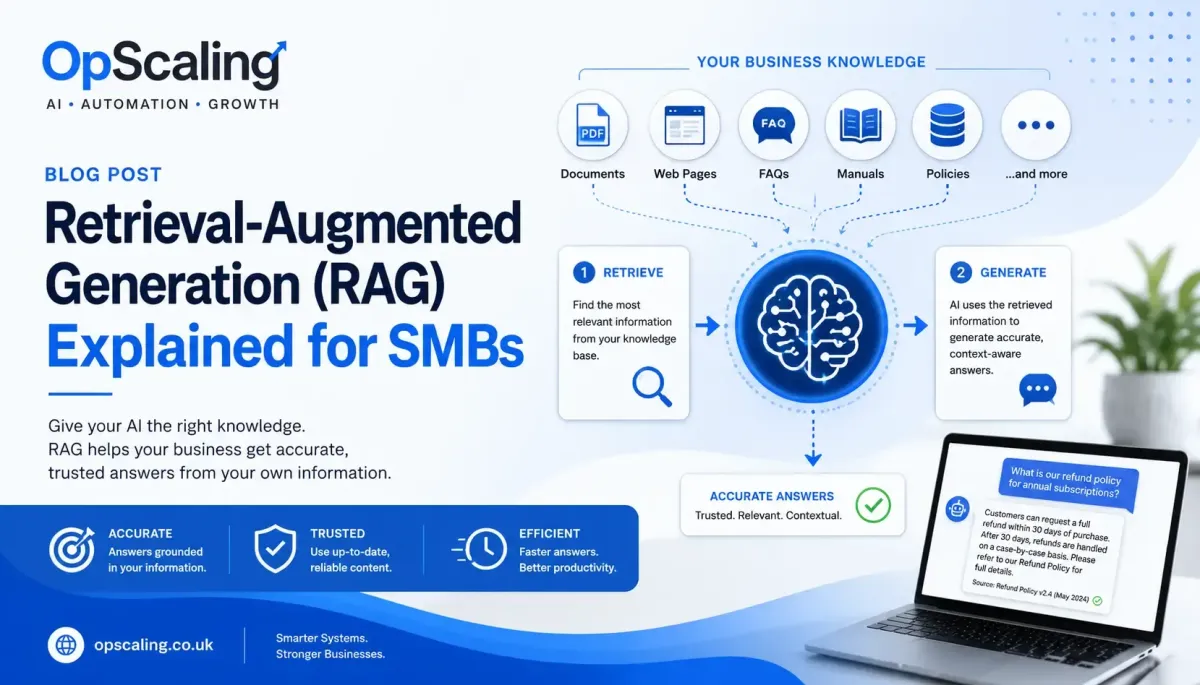
Retrieval-Augmented Generation (RAG) is an AI technique that allows a Large Language Model (LLM) to search and retrieve relevant information from external sources before generating a response.
Rather than relying solely on what the AI learned during training, RAG gives it access to your organisation's own knowledge, making responses more accurate, current and relevant.
In simple terms: RAG = Search first, answer second.
A Simple Analogy
Imagine asking two employees the same question.
Employee A answers entirely from memory.
Employee B first checks your company handbook, product documentation, policies and knowledge base before replying.
Employee B is far more likely to provide an accurate and up-to-date answer.
RAG enables AI to behave like Employee B.
How RAG Works
The process typically follows these steps:
A user asks a question.
The system searches a knowledge base for relevant information.
The most relevant documents or passages are retrieved.
These documents are supplied to the AI model as context.
The AI generates a response based on both the user's question and the retrieved information.
This means the AI is not guessing or relying only on its pre-trained knowledge.
Where Does the Information Come From?
A RAG system can retrieve information from many sources, including:
Company websites
PDFs
Word documents
Knowledge bases
FAQs
Product manuals
Standard operating procedures
Internal documentation
Help centre articles
Policy documents
For example, if a customer asks about your refund policy, the AI can retrieve the latest version of your refund policy before answering.
Why is RAG Important?
Without RAG, an AI model:
Cannot know your latest business information.
May provide outdated information.
May invent answers (sometimes called hallucinations).
Cannot access documents it has never seen.
With RAG, the AI can:
Provide more accurate answers.
Reference your latest documentation.
Respond using your company's own terminology.
Reduce the likelihood of incorrect or fabricated information.

RAG vs Traditional Search
Traditional search engines look for keywords.
RAG uses semantic search, meaning it searches by meaning rather than exact words.
For example, these questions may all retrieve the same document:
"How do I cancel my subscription?"
"How do I end my membership?"
"Can I stop my account?"
Even though the wording differs, the AI understands they have the same intent.
RAG Does Not Replace Structured Relational Databases
RAG is designed for unstructured information, such as documents and text.
Traditional databases are still needed for structured data, such as:
Customer records
Order numbers
Appointment dates
Product prices
Inventory levels
CRM fields
Modern AI systems often combine both approaches.
For example:
A CRM provides structured customer information.
A RAG system retrieves company policies and documentation.
The AI uses both to generate a personalised response.
Common Business Uses
Many SMBs use RAG to power:
AI customer support assistants
Internal knowledge assistants
Employee onboarding tools
Technical support systems
Sales assistants
HR knowledge bases
IT help desks
Rather than searching through folders or manuals, employees simply ask questions in natural language.
Why RAG Matters for SMBs
Retrieval-Augmented Generation transforms AI from a general-purpose chatbot into a business assistant that understands your organisation.
By combining your company's knowledge with the reasoning abilities of modern language models, RAG enables AI to deliver responses that are more accurate, more trustworthy and more relevant to your business. As AI adoption continues to grow, RAG is becoming one of the foundational technologies behind intelligent customer support, knowledge management and business automation.
The Problem with Standard AI
To understand why RAG is so vital, we first need to look at the limitations of the AI tools you might already be using.
Large Language Models (LLMs) like ChatGPT are trained on vast amounts of data from the internet. They are brilliant at predicting the next word in a sentence, but they have two major flaws for businesses:
1. Hallucinations
Because they are essentially guessing based on patterns, they can confidently invent facts, statistics, or product features that simply do not exist. For a business, this is a reputational minefield.
2. Ignorance of Your Business
If a customer asks your AI chatbot,"What is your returns policy for bespoke items?", a standard AI will either guess incorrectly or tell the customer it does not know. It has no access to your proprietary data.
RAG fixes both of these issues by giving the AI a factual cheat sheet before it opens its mouth.
How RAG Works: The Open-Book Exam Analogy
The easiest way to understand RAG is to think back to your school days.
Taking a standard AI test is like a closed-book exam. The student (the AI) has to rely entirely on what they memorised during revision (their training data). If they forget a date or a formula, they have to guess—and they might get it wrong.
Using RAG is like an open-book exam. You allow the student to take their textbooks and notes into the exam hall. When asked a question, they first look up the exact answer in their notes, and then they write it down in a cohesive, well-spoken paragraph.
In the world of AI, this process happens in three distinct stages:
Stage 1 – Retrieval
When a user asks a question (e.g., "Do you offer same-day delivery in Greater Manchester?"), The system does not ask the AI to answer straight away. Instead, it searches your business's private documents—your website, PDF manuals, internal wiki, or pricing spreadsheets. It retrieves the specific paragraphs that mention "delivery" and "Greater Manchester".
Stage 2 – Augmentation
The system then takes the user's original question and sticks the retrieved documents right next to it. It creates a new prompt that looks like this:
"Here is a question from a customer, and here are our internal delivery policies. Please answer the question using only the information provided below."
Stage 3 – Generation
Finally, the AI generates its response. Because its answer is grounded entirely in your actual business documents, it cannot hallucinate. It provides a highly accurate, conversational answer based purely on your facts.
Why SMBs Should Care About RAG
You might be thinking,"That sounds clever, but do I really need it?"The short answer is yes, especially if you want to compete with larger companies. Here is why RAG is a game-changer for smaller businesses.
Drastically Reduced Hallucinations
Trust is the cornerstone of any SMB. If your AI chatbot promises a customer a 50% discount that does not exist, you have a major problem on your hands. RAG acts as a guardrail, ensuring the AI only speaks about what you have explicitly told it to.
Cost-Effective Customisation
Historically, if a business wanted an AI that knew its specific data, it had to build a custom model from scratch or use a highly complex process called 'fine-tuning'. This costs tens of thousands of pounds. RAG allows you to achieve similar results simply by connecting an off-the-shelf AI to a database of your existing documents. It is incredibly cost-effective.
Enhanced Data Security and GDPR Compliance
With a properly configured RAG system, your sensitive business data is not used to train public AI models. The documents stay within your secure environment (or a private cloud tenant). For UK businesses, this means you can leverage AI without breaching your UK GDPR obligations—the AI only sees the specific paragraphs needed to answer a single query, and then it forgets them.
Practical Use Cases for Small and Medium Businesses
How does this look in the real world? Here are a few ways SMBs are deploying RAG right now.
Upgrading Customer Support
Moving Beyond FAQ Pages
Instead of forcing customers to trawl through a dense FAQ page, you can implement a RAG-powered chatbot on your website. It retrieves the precise answers from your help centre, reducing friction and improving satisfaction.
Handling Complex Enquiries
If you run an IT support company, a customer might ask, "How do I reset my router if the indicator light is flashing orange?"The RAG system instantly retrieves the specific troubleshooting guide for that exact router model and guides the customer through it, freeing up your human staff for actual engineering work.
Supercharging Internal Operations
The Ultimate Employee Onboarding Tool
New hires always have questions:"How do I submit expenses?"What is the holiday allowance?"Where is the brand asset folder stored?"A RAG system hooked up to your HR folders and employee handbook acts as a 24/7 mentor, saving your managers hours of repetitive explanations.
Streamlining Sales and Tendering
If your sales team spends hours looking for past proposals or specific technical specifications to put into a new tender document, RAG can automate this. They can ask the system,"Find me three examples of how we helped retail clients reduce their energy bills last year," and the system will pull the exact cases from your archived documents.
Bespoke Content Creation
Maintaining Brand Voice
Marketing teams can use RAG to ensure any AI-generated content strictly adheres to their brand guidelines. By retrieving the company's style guide and previous successful campaigns before generating a new blog post, the AI maintains the exact tone and terminology unique to your business.
RAG Versus Traditional Search and Fine-Tuning
It is worth briefly clarifying what RAG is not.
RAG vs. Traditional Search
Traditional search engines rely heavily on keywords. If a user searches"How do I cancel my subscription?" but your documentation says"Membership termination process", a keyword search may struggle. RAG uses semantic search—it understands that "cancel," "end," "stop," and "terminate" are closely related, resulting in far more accurate retrieval.
RAG vs. Fine-Tuning
Retrieval-Augmented GenerationFine-Tuning
Retrieves current information. Changes model behaviour. Easy to update, Expensive to retrain, Ideal for company knowledge. Ideal for specialist tasks. Documents can change daily. Training data changes rarely. No retraining required. Retraining required
For most SMBs, RAG is significantly more practical and affordable.
How to Get Started with RAG
You do not need a PhD in computer science to start using RAG. Here is a practical roadmap for implementing it in your business.
Step 1 – Audit and Organise Your Data
RAG is only as good as the data it retrieves. If your internal documents are a mess of contradictory, outdated Word files from 2018, your AI will give contradictory, outdated answers. Start by centralising and cleaning up your most important documents (policies, product guides, pricing). Remove duplicates and outdated versions.
Step 2 – Choose the Right Platform
You do not need to build a RAG system from scratch. Many existing software platforms now have RAG baked in:
Microsoft Copilot: If you use Microsoft 365, Copilot uses RAG to search your SharePoint, OneDrive, and Outlook data securely.
Customer Support Tools: Platforms like Zendesk or Intercom now offer AI agents that use RAG on your help centre articles.
No-Code Builders: Tools like Chatbase, Dify, or Flowise allow you to upload PDFs and generate a RAG chatbot in minutes, which you can embed on your website.
Step 3 – Start with a Pilot Programme
Do not try to boil the ocean. Pick one specific use case—such as a chatbot for your returns policy, or an internal tool for your HR department. Test it rigorously. See where it excels and where the retrieved data falls short, then refine your documents accordingly.
Step 4 – Scale Gradually
Once your pilot is stable, expand to more document sets, add user authentication, and integrate with your existing tools (CRM, ticketing system, etc.). Re-evaluate costs at each stage—RAG is cheap, but it is not free.
Common Pitfalls to Avoid
Garbage In, Garbage Out
If your source documents are poorly written or contradictory, your answers will reflect that. Clean your data first.
Outdated Information
If old documents remain in the knowledge base, the AI may retrieve outdated guidance. Regular reviews are essential.
Security Oversights
Not every employee should access every document. Implement role-based filtering at the retrieval stage to ensure proper permissions.
Chunk Size Mismanagement
Chunks that are too small lose context; chunks that are too large dilute relevance. Experiment with sizes between 200–500 words and overlap them slightly (e.g., 10–20%) so no meaning falls through the cracks.
Combining RAG with AI Agents
The real power appears when RAG is combined with AI agents. Instead of simply answering questions, the AI can:
Retrieve company information
Make decisions
Complete workflows
Update CRM records
Trigger automations
Create follow-up tasks
Draft emails
Generate reports
The retrieved knowledge provides the context, while the AI agent carries out the required actions. This creates intelligent business automation that is both informed and actionable.
What relationship do vector databases have with RAG?
Vector databases are one of the core technologies that enable RAG, but they are not the same thing.
A useful way to think about it is:
RAG is the overall process or architecture.
A vector database is one of the tools that makes that process efficient.
How They Fit Together
A typical RAG system follows this workflow:
Documents
(PDFs, website, manuals, FAQs) │ ▼ Split into chunks │ ▼
Create vector embeddings │ ▼
Store in Vector Database │
──────── User asks question ──────── │ ▼
Convert question into embedding │ ▼
Search Vector Database │ ▼
Retrieve relevant document chunks │ ▼
Send retrieved text + question
to the LLM │ ▼
Generate final answer
The vector database is responsible for the retrieval part of Retrieval-Augmented Generation.
What is a Vector Database?
A vector database stores information as embeddings rather than plain text.
An embedding is simply a list of numbers that represents the meaning of some text.
For example:
"The customer wants to cancel." ↓ [0.13, -0.74, 0.91, 0.22, ...]The numbers themselves are not meaningful to humans, but they allow the computer to determine how similar pieces of text are.
Why Not Use a Traditional SQL Database?
Imagine you search for:
"How do I cancel my subscription?"
Your documentation might contain:
"Membership termination procedure"
A SQL database searching with LIKE '%cancel%' may not find anything because the word cancel doesn't appear.
A vector database understands that:
Cancel
End
Terminate
Close account
Stop membership
All have similar meanings.
It searches by semantic similarity, not exact wording.
What Does the Vector Database Actually Store?
Suppose you upload a PDF.
The system might split it like this:
ChunkText1Company history2Refund policy3Warranty information4Product installation5Health & Safety
Each chunk is converted into an embedding.
The vector database stores something like:
Embedding A → Refund policy Embedding B → Warranty Embedding C → Installation guide Embedding
 D → Company history
When someone asks:
"Can I get my money back?"
The question is also converted into an embedding.
The database searches for the closest match.
Instead of returning:
Company history
it returns
Refund policy
because its meaning is much closer.
Why is This So Fast?
Large businesses may have:
10,000 documents
100,000 document chunks
Millions of embeddings
Searching every document would be far too slow.
Vector databases use specialised indexing algorithms (such as Approximate Nearest Neighbour search) to quickly find the most semantically similar embeddings, often in milliseconds.
Popular Vector Databases
Some of the most widely used include:
Pinecone
Weaviate
Qdrant
Milvus
Chroma pgvector (extension for PostgreSQL)
Azure AI Search (vector search)
Elasticsearch (vector search)
OpenSearch (vector search)
Many businesses never interact with these directly because AI platforms use them behind the scenes.
Does Every RAG System Use a Vector Database?
Usually, yes—but not always.
Some smaller RAG implementations simply use:
Keyword search
Full-text search
SQL queries
Search engines such as Elasticsearch
However, modern RAG systems almost always incorporate vector search because it produces much better results for natural language questions.
Many production systems actually use hybrid search, combining:
Keyword search
Metadata filtering
Vector similarity search
This often provides the most accurate retrieval.
How This Relates to HighLevel
Taking HighLevel as an example:
When you add:
FAQs
Website pages
Knowledge Base articles
Business information
HighLevel almost certainly converts that information into embeddings and stores it in a vector index (or vector database).
When a customer asks:
"Do you offer emergency plumbing?"
HighLevel doesn't ask the LLM to guess.
Instead it:
Converts the question into an embedding.
Searches the vector database.
Retrieves the most relevant content.
Sends that content to the LLM.
Generates a grounded response.
The user only sees an intelligent answer, but behind the scenes, the retrieval stage is powered by vector search.
A Good Analogy
Think of a traditional database as a filing cabinet organised by labels.
If you don't know the exact label, finding the right document can be difficult.
A vector database is more like an experienced librarian.
You don't need to know the title of the book. You simply describe what you're looking for, and the librarian understands the meaning of your request and finds the most relevant material.
That is precisely why vector databases have become a cornerstone of modern RAG systems. They enable AI to retrieve information based on meaning rather than exact words, making business knowledge far more accessible and allowing language models to generate responses that are grounded in your own documentation rather than relying solely on their pre-trained knowledge.
The Future of RAG's
RAG represents a significant step forward in how businesses use artificial intelligence. Over the next 12–24 months, expect:
Multimodal RAG– retrieving from images, videos, and audio transcripts, not just text.
Agentic RAG– where the system not only answers but also takes actions (e.g., updating a CRM or raising a purchase order).
Better small models– fine-tuned for specific UK industries (legal, financial, healthcare) that run on modest hardware.
For SMBs, this levels the playing field. Technologies that were once reserved for large enterprises are now accessible through modern AI platforms and cloud-based tools, enabling smaller organisations to deliver better customer service, improve employee productivity, and preserve valuable organisational knowledge.
The Bottom Line
Retrieval-Augmented Generation is not just a fleeting tech buzzword; it is the bridge between generic, slightly unreliable AI and a highly bespoke, accurate business assistant.
For SMBs, RAG levels the playing field. It allows you to offer the kind of instant, 24/7, highly knowledgeable customer and employee support that was previously only possible for enterprises with deep pockets and vast development teams. By simply connecting an AI to the knowledge you already possess, you can save time, reduce costs, and radically improve your customer experience.
The technology is ready. The question is: which part of your business will you augment first?
Have you started exploring RAG in your business? Or are you still weighing up the options? Drop us a comment below—we would love to hear from fellow UK founders and operators.