
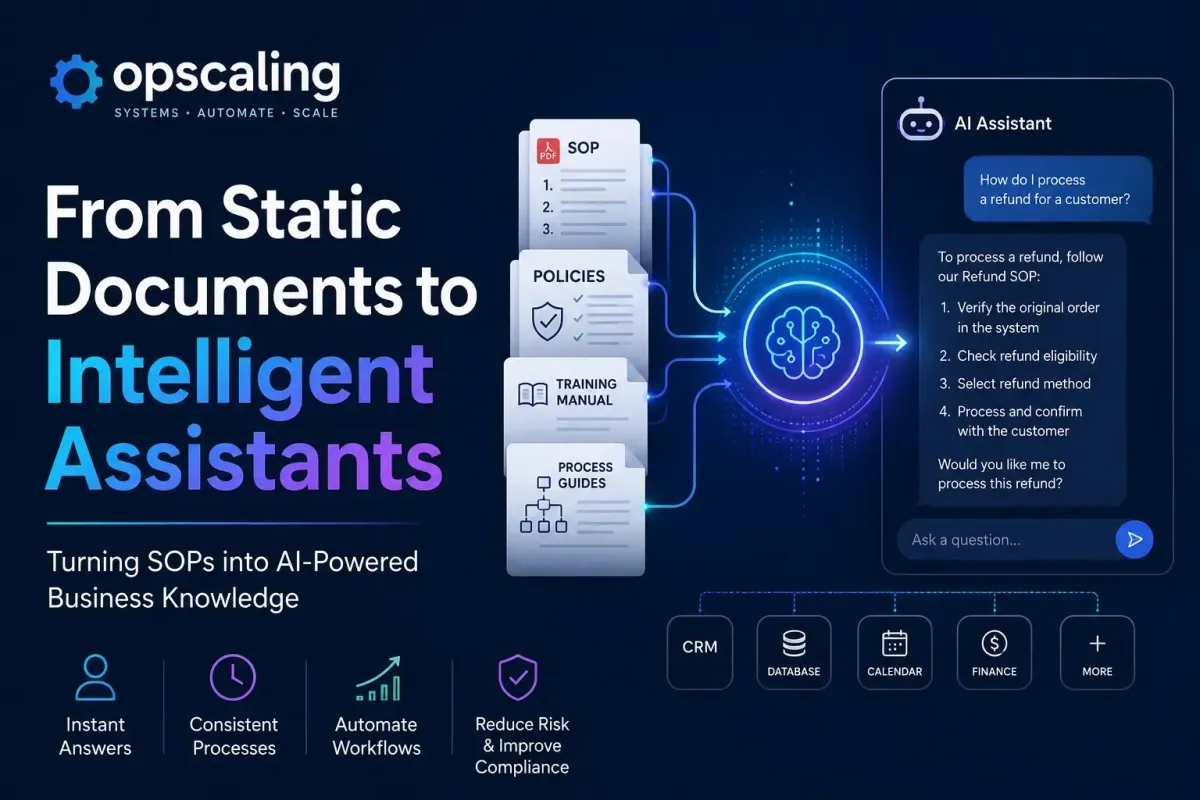
Turning SOPs into AI Assistants: Transform Business Knowledge into Intelligent Automation
Most businesses already possess the valuable knowledge required to build highly effective AI assistants. The problem is that this knowledge exists in the wrong format.
Standard Operating Procedures (SOPs), training manuals, and internal wikis are typically written for human consumption. They assume a reader with patience, contextual awareness, and the ability to skim fifty pages to find a single answer. AI assistants, however, require information to be meticulously organised so they can retrieve, understand, and apply it during live conversations or automated decision-making.
For small and medium-sized businesses (SMBs), the opportunity is not simply to upload a PDF into a generic AI chatbot and hope for the best. The goal is to transform static business knowledge into an intelligent, operational system. When done correctly, this system can answer complex questions, guide employees through intricate processes, automate repetitive work, and support customers—all while remaining strictly grounded in your documented procedures.
This is not about replacing human intelligence; it is about engineering a knowledge infrastructure that amplifies it.
Why Every Business Already Has AI Training Data
There is a persistent misconception that to leverage AI, a business must somehow acquire vast, expensive datasets or "train" a model from scratch. In reality, the most valuable AI training data for an SMB is the proprietary knowledge already sitting on its servers.
Every business runs on rules. Whether those rules are formally documented or informally held in the minds of senior staff, they dictate how work gets done. When you formalise these rules into SOPs, you are essentially writing the source code for your business operations.
Instead of attempting to teach a Large Language Model (LLM) general business acumen, the most effective strategy is to give it your specific business acumen. The LLM already understands language, reasoning, and conversation. Your job is to give it your company's specific context, policies, and procedures.
Your existing documentation is the raw material. It just needs to be refined.
What is an SOP?
At its core, a Standard Operating Procedure is a set of step-by-step instructions compiled to help workers carry out routine operations.
However, when viewed through the lens of AI architecture, an SOP is much more than a document. It is structured business logic. It contains:
- Company policies: The immutable rules of the business
- Step-by-step processes: The exact sequence of actions required to complete a task
- Troubleshooting guides: Conditional logic mapping symptoms to solutions
- Compliance requirements: Regulatory boundaries that must not be crossed
- Product knowledge: Specifications, use cases, and limitations
- Internal terminology: The specific language your business uses to describe concepts
- Decision trees: If/then scenarios that guide employee choices
- Escalation procedures: Clear rules on when a problem exceeds standard authority
Instead of employees searching through folders or interrupting colleagues to ask questions, an AI assistant can retrieve the exact relevant information from these procedures instantly. But to do this, we must rethink how that information is stored.

Why Traditional SOPs Are No Longer Enough
Traditional SOPs are static. They are passive documents that sit in a shared drive or a dusty binder, waiting for a human to actively seek them out. This creates several friction points:
The Search Problem: Finding the right answer in a forty-page PDF requires keyword searching, scanning headings, and reading irrelevant sections. Employees waste valuable time navigating documentation rather than executing tasks.
The Interpretation Problem: SOPs are often written by managers and interpreted by front-line staff. Gaps in understanding lead to inconsistent execution. One employee might interpret a policy differently from another, resulting in variable customer experiences.
The Currency Problem: SOPs frequently become outdated. When a process changes, updating a single master document is often deprioritised, leading to staff working from old information. Outdated procedures create compliance risks and operational errors.
The Context Problem: A written SOP cannot adapt to the specific context of a user's question. It provides the what, but the user often needs the how applied to their immediate situation. Static documents cannot account for the nuance of real-world scenarios.
For SMBs, these friction points result in slower onboarding, inconsistent customer service, and a dangerous dependency on a few key staff members who hold the "institutional knowledge" in their heads.
From Documents to Intelligent Knowledge
The transition from a traditional SOP to an AI assistant represents a fundamental shift in how a business operates. It moves documentation from being a passive reference library to becoming an active, operational intelligence layer.
Instead of merely describing how work should be done, the SOP becomes the foundational logic for an AI assistant that supports employees in real-time, improves consistency across the business, and automates routine operations.
Rather than reading a manual, an employee can simply ask:
- "How do I process a refund for a customer who paid by invoice?"
- "Which workflow handles cancelled appointments?"
- "What is our exact policy on customer complaints regarding delivery delays?"
- "What should I do if a card payment fails mid-transaction?"
The AI retrieves the relevant procedure, explains it in the context of the specific query, and, where appropriate, connects to other business systems to complete parts of the process automatically.
To achieve this, we must stop thinking about document uploads and start thinking about knowledge engineering.
The Journey from SOP to AI Assistant
Transforming a static document into an intelligent assistant requires a structured, methodical approach. The architecture underpinning this is known as Retrieval-Augmented Generation (RAG), but before we can utilise RAG, we must prepare the knowledge.
Step 1: Collect Knowledge
The first step is an audit of your business's intellectual capital. You must gather documentation from across the entire organisation. This typically includes:
- Official SOP documents
- Training manuals and onboarding guides
- HR policies and employment handbooks
- Product documentation and technical guides
- CRM notes and historical customer interactions
- Internal wiki pages (Confluence, Notion, etc.)
- Frequently Asked Questions (FAQs)
- Relevant meeting documentation and decision logs
The goal is to be exhaustive. The AI assistant can only be as knowledgeable as the data it is given. Cast a wide net initially; you can refine later.
Step 2: Clean the Information
This is often the most uncomfortable phase for businesses. AI performs significantly better when knowledge is up to date, non-duplicated, clearly written, consistent, and well organised.
When businesses begin compiling their knowledge bases, they almost invariably discover conflicting instructions. One SOP might say a refund requires a manager's approval, while a newer wiki page says it can be done by the front-line team. If both are fed to the AI, it will either hallucinate a confused answer or provide inconsistent responses to different employees.
Preparing documentation for AI forces a business to reconcile its own operations. Duplicates must be removed. Outdated processes must be archived. Conflicting information must be resolved. By the end of this step, you should have a single, authoritative source of truth for any given process.
Step 3: Chunk the Content
LLMs have a limited context window—meaning they can only "read" a certain amount of text at one time. If you feed a 50-page operations manual into an AI and ask a simple question, the model will struggle to identify the two paragraphs that actually matter.
Instead of treating a large manual as one monolithic document, knowledge engineering requires dividing the text into logical, self-contained sections known as "chunks."
For example, a customer service manual might be chunked into:
- Booking new appointments
- Cancelling existing appointments
- Handling billing complaints
- Creating and sending invoices
- Processing password resets
The size and boundary of these chunks are critical. If a chunk is too small, it loses context. If it is too large, it introduces noise. Good chunking ensures that each piece of text represents a single, complete idea or procedure.
Step 4: Generate Embeddings
Once your content is chunked, each chunk is converted into a numerical representation called a vector embedding. Embeddings transform text into lists of numbers that capture semantic meaning.
This is a fundamental shift from traditional keyword search. Instead of matching exact terms, embeddings allow the AI to search by meaning. For example, a user might ask "A customer wants to move their appointment," while the documentation mentions "Appointment rescheduling." The AI can still find the correct section because it understands that these phrases are semantically similar.
Embeddings typically have hundreds or thousands of dimensions. This high-dimensional representation captures subtle relationships between concepts, enabling sophisticated semantic understanding.
Step 5: Store in a Vector Database
The embeddings are stored in a vector database—a specialised system designed to store and query high-dimensional vectors efficiently. These databases enable fast similarity searches, finding the most semantically relevant chunks for any query.
Popular vector databases include:
- Pinecone (fully managed, enterprise-ready)
- Weaviate (open-source with built-in modules)
- Chroma (lightweight, ideal for development)
- Qdrant (high-performance, open-source)
- pgvector (PostgreSQL extension, great for existing Postgres users)
Vector databases offer several advantages for AI applications: they are optimised for vector operations, handle high-dimensional data efficiently, scale to millions of vectors, and support distributed computing for workload balancing.
Step 6: Build the Retrieval Pipeline
With your chunks embedded and stored, you can now build the retrieval pipeline. When someone asks a question:
1. The question is converted into an embedding
2. The vector database finds the most relevant knowledge chunks
3. Those chunks are sent to the LLM as context
4. The LLM generates a response grounded in your documentation
This process dramatically reduces hallucinations because the AI answers from your company's knowledge rather than relying solely on its pre-trained parameters. The result is accurate, trustworthy responses that reflect your actual policies and procedures.
Preparing Your Documentation for AI: A Deeper Dive
The cleaning and chunking phases cannot be rushed. The quality of your AI assistant is entirely dependent on the quality of your knowledge base. In the world of AI architecture, there is a fundamental rule: garbage in, garbage out.
Metadata and Tagging
Each chunk should be tagged with relevant metadata. This might include the department (e.g., HR, Sales, Operations), the role it applies to (e.g., Manager, Front-line), and the specific scenario (e.g., Refunds, Onboarding).
While modern AI relies heavily on semantic search, metadata allows for hard filters, ensuring that a junior employee does not accidentally retrieve a highly sensitive executive procedure. Metadata also enables better retrieval by narrowing the search space.
Formatting for Clarity
AI models parse structure well. Use clear headings, bullet points, and numbered lists. A dense block of text is difficult for an AI to parse for specific conditional logic.
If an SOP contains a decision tree (e.g., "If X happens, do Y; if Z happens, do W"), format it explicitly so the chunk isolates that logic clearly. The more structured your documentation, the better the AI will understand it.
Removing "Fluff"
Traditional business writing often includes lengthy introductions, pleasantries, and background context that is not necessary for executing a procedure. When chunking, strip away unnecessary prose. The AI does not need to know the history of why the refund policy was created; it only needs to know the exact steps to execute it.
Chunking and Knowledge Engineering Strategies
How you chunk your SOPs will dictate the architecture of your AI assistant. There is no one-size-fits-all approach, but several strategies work well for SMBs.
Sequential Chunking
For step-by-step processes, chunk the document by each major step or phase. If an SOP has ten steps, you might create three chunks: Preparation (Steps 1–3), Execution (Steps 4–7), and Completion (Steps 8–10). This ensures that when a user asks about the execution phase, the AI is not distracted by the preparation steps.
Role-Based Chunking
If a process crosses departmental boundaries, chunk it by the actor involved. One chunk contains the instructions for the Sales team, another for the Fulfilment team, and a third for the Finance team. This allows the AI to tailor its response based on who is asking the question.
Scenario-Based Chunking
For complex troubleshooting guides, chunk by the specific problem. Instead of one large document titled "IT Troubleshooting," create distinct chunks for "Cannot Connect to WiFi," "VPN Errors," and "Software Installation Failures."
Hierarchical Chunking
For very complex documents, consider a hierarchical approach. Create high-level chunks that summarise entire procedures, and lower-level chunks that contain the detailed steps. The AI can retrieve the summary first, then drill down to specifics as needed.
The ultimate goal of knowledge engineering is to create a library of chunks where every piece of information is distinct, contextualised, and easily retrievable.
Beyond Simple Question Answering
Modern AI assistants can do much more than search documents. The most capable systems combine knowledge retrieval with action capabilities, transforming SOPs from passive references into active business processes.
Advanced AI assistants can:
- Guide employees through procedures with step-by-step assistance
- Complete forms and data entry automatically
- Trigger workflows in connected business systems
- Update CRM records based on conversation outcomes
- Generate reports from structured data
- Escalate exceptions to human reviewers when needed
- Create support tickets automatically
- Summarise conversations for handover or audit
- Collect missing information through conversational follow-up
This evolution moves organisations from Standard Operating Procedures to what might be called Agent Operating Procedures (AOPs)—frameworks that combine conversational instructions with code-based logic to enable AI agents to act while maintaining guardrails.
Combining SOPs with Structured Data
The most capable business assistants combine two types of knowledge.
Unstructured Knowledge
This is the content of your SOPs, manuals, emails, and documentation—retrieved through RAG. This knowledge answers questions like "What is our process for handling complaints?" or "What are the product specifications?"
Structured Data
This is your operational data: CRM records, customer information, orders, pricing, stock levels, appointment schedules, and financial data—retrieved through APIs, databases, or automation platforms like Make, Zapier, or MCP-enabled systems.
Combining these creates assistants that both know and act.
For example, consider a customer asking, "Can I move tomorrow's appointment?" A combined assistant might:
1. Search the appointment policy using RAG
2. Retrieve tomorrow's booking from the CRM
3. Check engineer's availability
4. Offer alternative times
5. Update the booking
6. Send confirmation
One conversation can combine knowledge retrieval with deterministic business systems, creating a seamless experience for both employees and customers.
AI Agents versus AI Assistants
It is useful to distinguish between two types of AI systems.
AI Assistants respond to queries and provide information. They answer questions, retrieve documents, and guide employees. These are the most common first steps and are well-suited for many use cases, particularly when human oversight is still required.
AI Agents take action independently. They execute workflows, make decisions, and perform tasks without constant human supervision. Agentic systems are more powerful but require more robust guardrails.
Most organisations begin with assistants and evolve toward agents as they build confidence in the technology and establish appropriate governance. The next frontier is Agentic AI, where autonomous systems execute workflows and make decisions rather than just answering questions. This shift raises the stakes for documentation quality significantly—an agent relying on flawed documentation will execute the wrong actions, not just provide incorrect answers.
Human-in-the-Loop Decision Making
Not every decision should be automated. Effective AI systems know when to escalate and request human input.
AI can confidently handle questions about:
- Opening hours and locations
- Product specifications and standard features
- Routine procedures and policy questions
- Frequently asked questions
However, AI should request human approval for:
- Refunds above a defined threshold
- Legal advice or compliance decisions
- Pricing exceptions or significant discounts
- Employee disciplinary matters
- Contract changes or negotiations
- Complex or unusual cases
The goal is an intelligent assistant that supports human decision-making rather than an uncontrolled decision-maker. Good systems build trust by knowing their limitations.
The Strategic Value for SMBs
Transforming SOPs into AI assistants delivers measurable improvements for small and medium-sized businesses.
Faster Employee Onboarding
New employees can ask questions and receive immediate answers rather than spending weeks reading documentation and asking colleagues. This accelerates time-to-productivity and reduces the burden on experienced staff.
Consistent Customer Service
AI systems follow documented procedures consistently, delivering the same quality of service regardless of who is on duty. This consistency builds customer trust and reduces variability in outcomes.
Reduced Training Costs
With an AI assistant available 24/7, training becomes more efficient. Employees learn by doing, with support available whenever questions arise.
Lower Support Workloads
When employees can answer their own questions through an AI assistant, they spend less time interrupting colleagues or searching for information. Support teams can focus on complex cases rather than routine inquiries.
Improved Knowledge Retention
When employees leave, their knowledge can leave with them. AI systems preserve institutional knowledge, ensuring that expertise remains accessible even when key individuals move on.
Better Compliance
AI assistants follow documented procedures, reducing the risk of non-compliant actions. Audit trails show exactly what guidance was provided and what actions were taken.
24/7 Availability
Unlike human employees, AI assistants work around the clock. Employees in different time zones or working non-traditional hours can access support whenever needed.
Common Mistakes When Building AI Assistants
Many organisations make avoidable mistakes when building AI assistants. Understanding these pitfalls can help you avoid them.
Mistake 1: Assuming More Documents Are Better
More documents are not always better. Duplicate, conflicting, or low-quality documentation confuses AI systems. Success depends on quality, not quantity.
Poor knowledge produces poor answers, regardless of how advanced the language model is. Clean, current, and consistent documentation is essential.
Mistake 2: Neglecting Chunking Strategy
How you chunk documents significantly affects retrieval quality. Treating an entire manual as one document will dilute relevance; chunking too finely loses context. The right chunking strategy depends on your content and use cases.
Mistake 3: Underestimating the Need for Clean Documentation
Many SOPs describe what to do but lack information about how to make decisions or handle exceptions. Internal documentation frequently includes only the "happy path" and omits edge cases.
AI systems need information about:
- Scope: What situations does this procedure cover?
- Decision criteria: How do we choose between options?
- Calculation logic: How are outcomes determined?
- Exceptions: What happens when things go wrong?
Without this information, AI systems must guess—and guessing leads to errors.
Mistake 4: Ignoring Governance
Who reviews AI answers? How are policies updated? What is the escalation process? Governance is often overlooked in the rush to implement AI. Yet clear governance is essential for maintaining accuracy and managing risk.
Mistake 5: Overlooking Integration Needs
AI assistants that only answer questions have limited value. The greatest returns come from assistants that integrate with business systems—checking availability, updating records, and executing workflows.Mistake 6: Forgetting the Human Element
AI assistants should augment, not replace, human intelligence. Organisations that forget this often face resistance from employees who feel threatened or undervalued. Involving staff in the design and implementation process builds trust and adoption.
Security, Permissions and Governance
Enterprise AI assistants require appropriate security and governance. Key considerations include:
Access Control
Not every employee should see every document. AI assistants should respect organisational permissions, returning only information that the user is authorised to view. Role-based access control ensures sensitive information remains protected.
Audit Trails
What questions were asked? What answers were given? What actions were taken? Auditability builds trust and enables improvement. Comprehensive logging allows organisations to review and refine AI performance.
Content Review
Who reviews AI answers? How often? Establishing review processes catches issues before they escalate. Regular audits of AI responses ensure ongoing accuracy.
Update Management
How are policy changes incorporated into the knowledge base? SOPs evolve, and AI systems must keep pace. Establish a clear process for updating documentation and propagating changes to the AI system.
Compliance
In regulated industries, AI systems must demonstrate compliance with applicable standards. This includes traceability of answers back to source documents and the ability to audit AI decisions.
Measuring ROI
The return on investment for SOP-to-AI transformation can be substantial, though it requires careful measurement.
Direct Cost Savings
- Training costs: Reduced onboarding time and training resource requirements
- Support costs: Fewer inquiries reaching support teams
- Operational costs: Automation of routine tasks
- Error reduction: Fewer mistakes and their downstream costs
Indirect Benefits
- Employee satisfaction: Easier access to information
- Customer satisfaction: Consistent, fast service
- Agility: Faster response to policy or product changes
- Scalability: Knowledge that scales without proportional headcount growth
Key Performance Indicators
- Query resolution rate without human intervention
- Time to answer employee questions
- Reduction in support tickets
- Employee satisfaction scores
- Onboarding time reduction
- Compliance audit pass rates
Future Trends
The transformation of SOPs into AI assistants is still in its early stages. Several trends will shape the future.
Agentic AI
As systems become more capable, they will shift from answering questions to taking actions. Agentic AI systems will execute workflows, make decisions, and coordinate across systems—all while remaining grounded in documented procedures.
Graph RAG
While most current systems use vector-based retrieval, Graph RAG—which combines vector search with knowledge graph techniques—offers more sophisticated reasoning capabilities. Graph RAG can connect related concepts and perform multi-hop reasoning, enabling more complex question answering.
Self-Learning Systems
Early AI systems require significant manual effort to maintain. Future systems will learn from interactions, automatically improving their retrieval and responses based on user feedback. This self-learning capability will reduce maintenance overhead and improve performance over time.
Process Discovery
Rather than requiring manual documentation, advanced platforms will discover processes by observing how employees work. This automated discovery will reduce the effort required to build knowledge bases and uncover undocumented processes.
Integration with Business Process Management
The future of SOP transformation lies in tight integration with business process management (BPM) systems. Organisations are already pursuing this vision, working toward a single source of truth where process maps generate SOPs, and SOPs inform AI systems.
Getting Started: A Practical Blueprint
For organisations ready to begin the journey from SOPs to AI assistants:
Phase 1: Assessment (Weeks 1–2)
- Conduct an audit of existing documentation
- Identify the highest-value use cases
- Assess documentation quality and gaps
- Define success metrics
Phase 2: Preparation (Weeks 3–4)
- Clean and standardise documentation
- Resolve inconsistencies
- Chunk content appropriately
- Add metadata for improved retrieval
Phase 3: Implementation (Weeks 5–8)
- Select tools (embedding model, vector database, LLM)
- Generate embeddings
- Build the retrieval pipeline
- Integrate with business systems
Phase 4: Deployment and Refinement (Ongoing)
- Launch with a controlled user group
- Gather feedback
- Refine chunking and retrieval
- Expand to additional use cases
Conclusion
Traditional SOPs are static documents that employees must search, interpret, and follow. AI transforms them into interactive knowledge systems that employees can simply ask.
Rather than reading a 40-page manual, an employee can ask:
- "How do I process a refund?"
- "Which workflow handles cancelled appointments?"
- "What is our policy on customer complaints?"
- "What should I do if payment fails?"
The AI retrieves the relevant procedure, explains it in context, and, where appropriate, completes parts of the process automatically.
For many SMBs, this represents a shift from documentation as a reference library to documentation as an operational intelligence layer. Instead of merely describing how work should be done, SOPs become the foundation for AI assistants that support employees, improve consistency, and automate routine business operations.
The technology is mature. The path is understood. The question is no longer whether to make this transition, but when.
This guide was originally published on OpScaling as part of a series on AI implementation for SMBs. For more articles on AI architecture, knowledge management, and business process optimisation, explore the resources section.